
Samsung presents its new tablets Galaxy Tab S7 and S7+
With the new Galaxy Tab S7 and S7+, Samsung offers the user a Tablet with a large screen full of useful tools both to take advantage of [...]


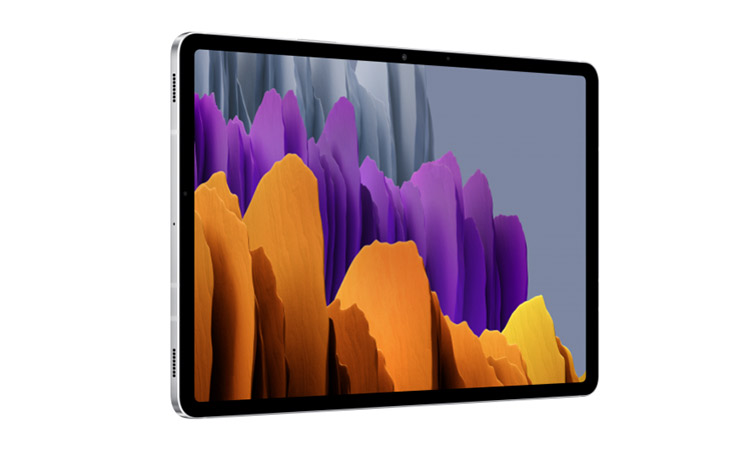
With the new Galaxy Tab S7 and S7+, Samsung offers users a tablet with a large screen packed with useful tools to unleash their creativity and enjoy entertainment, as well as take productivity to the next level.
Equipped with cutting-edge features and perfectly integrated into the Galaxy ecosystem, the Tab S7 and S7 + are designed to accompany the user at every moment of the day, whether to work, play, relax watching a movie and much more. With a new and improved S Pen, a stunning display and innovative features and functions, these tablets offer a wide variety of uses. Its powerful processor and expanded keyboard, along with updated versions of the Samsung DeX feature, allow you to do more in less time, with a PC-like experience.
A powerful device for work
With the new Galaxy Tab S7 and S7+, you can experience a smarter and more fluid way to complete daily tasks, wherever and whenever you want.
The unparalleled productivity features of both devices are powered by a next-generation processor. The processor's CPU, GPU and NPU offer enhanced performance, ensuring that multitasking and video conferencing are seamless when the user is short on time; and enjoying a high-quality video game is easier than ever.
Building on nearly a decade of design and technical innovation, the Galaxy Tab S7 and S7+ come with an improved S Pen included. Designed with a rounded form factor and elongated tip, the S Pen offers a natural writing and drawing experience. Combined with the screen refresh rate of up to 120Hz, the S Pen's biggest leap forward is reflected in responsiveness, with lag significantly reduced, allowing for true-to-life writing with precision and accuracy when taking notes.
The Samsung Notes app is a powerful complement to the improved S Pen. This app allows easy PDF import and annotation, as well as the ability to write and draw in the same area. In addition, it features the Audio Bookmark feature, which allows you to record conferences or meetings while the user simultaneously writes, and then synchronize them together. This way, the user can easily navigate through long lecture recordings by tapping on a phrase or sentence, automatically returning to the corresponding audio time. With the sync feature, you can quickly access and manage notes in the Samsung Notes app on the Galaxy Note20. You can take notes from the Galaxy Note20 and then pick up right where you left off from the Galaxy Tab S7 and S7+.
For its part, the improved Multi-Active window of the Galaxy Tab S7 and S7+ now allows you to open and run up to three applications at the same time, so that the user can make video calls, monitor emails and take notes at the same time. With the link feature, you can connect up to three applications together to save time. Additionally, both tablets come with an edge display, similar to the feature on Galaxy smartphones, providing quick access to the most used apps.
If you want to experience a PC-like interface on your tablet, you can use the Samsung DeX feature, along with the Samsung Keyboard Cover. This updated keyboard comes with an additional line of intuitive function keys, a larger touchpad, and several new angles, so the user can type and draw comfortably when away from a desk. The latest One UI brings a taskbar optimized for Samsung DeX – with the addition of screen zoom support and font size options, the user can customize the Samsung DeX to suit their preferences. After snapping a window to the right or left of the screen, your most recent and used apps appear for quick and easy access. Additionally, if you need to access a larger screen than the Tablet – for a presentation, for example – the Tab S7 and S7+ can be connected wirelessly to compatible televisions.
On the other hand, Samsung's alliance with Microsoft provides great benefits to users of Galaxy devices, including, for example, allowing Samsung Notes to be quickly synchronized with Microsoft OneNote and Outlook, so that important documents that have been saved on the Galaxy Note20 are not lost while the user was working from their Galaxy Tab S7 and S7 +.
An ideal device for moments of leisure
The Galaxy Tab S7 features an 11-inch LTPS TFT display, while the Tab S7+ features a 12.4-inch Super AMOLED display, both with a 16:10 aspect ratio image. Combined with the sound of AKG quad speakers, these screens offer an immersive cinematic experience from the comfort of home. The SGS-certified screens on the Galaxy Tab S7 and S7+ are easy on the eyes thanks to low blue light emission, so the user's eyes won't feel tired. With a refresh rate of up to 120Hz, you can enjoy smooth scrolling when swiping your social media feed; and a smart battery that adapts power output based on your activity, allowing the user to stream, play and create without being tethered to an outlet.
Samsung's new tablets make it easier to relax and unwind with available premium entertainment apps. These come with four months of free YouTube Premium, to enjoy YouTube content without interruptions; Netflix and Spotify.
For artists, designers or lovers of drawing, the S Pen is the great ally to bring out all your creativity. Available for the first time on an Android tablet, the popular drawing app Clip Studio Paint is the platform of choice for digital artists and comes preloaded on the Galaxy S7 and S7+. Additionally, a six-month free offer for Clip Studio Paint EX – the premium version of the app – will be available for all Galaxy users. This version provides access to advanced layout features, including multi-page management, the ability to extract lines of 3D data, and more.
With Noteshelf, you can create and customize virtual notebooks. Available for free on Tabs S7 and S7+, the app lets you add handwritten notes, geometric shapes, custom photos, audio recordings, and more to notebooks. You can even organize them on an easy-to-access virtual shelf.
If you want to produce eye-catching social media posts and marketing content, the Canva platform will display a wide variety of easy-to-use templates or create your own template. Galaxy Tab S7 and S7+ users will also have access to 200 exclusive templates and a free 30-day trial of the Canva Pro tool.
Unprecedented gaming experience
With the tablets' ultra-fast refresh rates and immersive displays on the Galaxy Tab S7 and S7+, users are treated to a whole new gaming experience. Plus, with the addition of Bluetooth controllers, the tablets provide a premium gaming experience that can be enjoyed from anywhere.
Other useful resources that optimize the user experience
Instead of uploading files or images to the cloud and downloading them to another device, Samsung Flow allows you to instantly transfer from phone to tablet. With Call and Message on other devices, you can check messages directly on your tablet when your phone is charging or out of reach.
Design that attracts attention
The Galaxy Tab S7 and S7+ are available in three modern and stylish colors: Mystic Black, Mystic Silver and Mystic Bronze.




Latest news



Outstanding sector